Working in CFD, I often have to create contours plots starting from rough data in a text file generated by in house codes. This can be easily accomplished using gnuplot. Here you can see a simple example of what you can do.
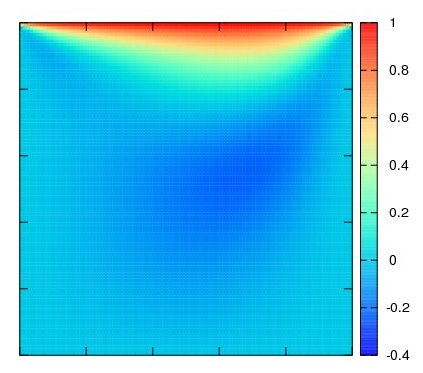
Being an openSUSE user, I will explain how to install gnuplot on this distribution, but the instructions to generate contours plots are absolutely general.
- The installation of gnuplot on openSUSE 10.3 is straightforward. Just use the 1-click install link available here, and follow the procedure shown by the installer.
- Gnuplot requires the data to be saved in a text file organized in one of the two following ways:
- One set of 3 coordinates (x y z) per line, with line breaks separating the data, and an empty line to separate the rows of the matrix of data.
- One single value (z) per line, with line breaks separating data, and an empty line to separate the rows of the matrix of data. For example, if you have a 3×2 matrix of data, the corresponding file will be:
a11
a12
—- empty line —-
a21
a22
—- empty line —-
a31
a32
- Once the data to plot are prepared in that format, which can be easily implemented in all computational codes, just start gnuplot in a terminal, typing gnuplot.
- The instruction to plot a simple contour plot are the following, assuming the data file is called data.dat:
- set size square -> It sets that the plot must be squared. Of course this is optional, and depends on the case.
- unset title -> It removes the title. You can use set title ‘text’ to set an appropriate title if you want.
- set pm3d map -> It configures gnuplot to generate contour plots.
- set xrange [0:100] and set yrange [0:100] -> They set the range of the plot. Change the interval according to your data.
- set format x “” and set format y “” -> They remove the numbers from the axes.
- set cbrange [0:1] -> It sets the range of the colorbar in the contour plot. Values out of range are coloured as the closest extreme value.
- set palette rgbformulae 22,13,10 -> It sets the colour palette. Please, see the reference for further information on this.
- splot ‘data.dat’
- At this point, gnuplot is set properly to plot your data. Just check the plot by showing it with: splot ‘data.dat’
- If the result is satisfactory, you can easily export it to an eps file, with the following commands:
- set term postscript enhanced color
- set output “data.eps”
- replot
Gnuplot offers a lot more features than those discussed here in short. Please refer to its documentation for further information. A useful guide which helped me to write this post can be found here.
12 Comments
Philipp K Janert
I saw your long posting regarding Gnuplot, and thought you might be interested to know that there is now a book on it: “Gnuplot in Action”. You can pre-order it directly from the publisher: Manning: Gnuplot in Action.
The book includes chapters on multi-dimensional plotting and color management, including recommendations for optimal palette design for data visualization.
If you want to learn more about the book and the author, check out my book page at Principal Value – Gnuplot in Action.
Let me know if you are interested in a review copy.
IonutVan
yes, gnuplot is a great tool, and I think there are only few publications in which you can no find some plots generated with this excelent soft.
Jarko
Well this is all great but what you are using is called color maps, not contour plots. Notice that with pm3d you are not in fact making any isolines, just plotting the color corresponding to the values at a given point. For actual contour plots, use “set contour” in gnuplot, with all the corresponding options. Not that the maps are way more convenient than the contours.
Alberto
Thanks Jarko. Someone calls them “filled contours” too though.
Gerardo
Hi Alberto
I have tried to replicate your example but am getting a warning “skipping unreadable file” and the plotting area is blank. Am i missing something in my input data file? It looks like this (see below gnuplot instructions and data): (x, y and z and ordered in rows with a space after each row and a line breaker at the end of each line)
Thanks a lot
Gerardo
set title ‘plot test’
set pm3d map
set xrange [0:10000]
set yrange [0:-1800]
set zrange [150000:17598000]
set cbrange [150000:17598000]
set palette rgbformulae 22,13,10
splot ‘test.txt’
1.25E+01 -5.00E+00 1.50E+05
4.25E+01 -5.00E+00 1.50E+05
8.45E+01 -5.00E+00 1.50E+05
1.43E+02 -5.00E+00 1.50E+05
2.26E+02 -5.00E+00 1.50E+05
3.41E+02 -5.00E+00 1.50E+05
5.02E+02 -5.00E+00 1.50E+05
7.28E+02 -5.00E+00 1.50E+05
1.04E+03 -5.00E+00 1.50E+05
1.49E+03 -5.00E+00 1.50E+05
2.11E+03 -5.00E+00 1.50E+05
2.97E+03 -5.00E+00 1.50E+05
4.19E+03 -5.00E+00 1.50E+05
5.89E+03 -5.00E+00 1.50E+05
8.43E+03 -5.00E+00 1.50E+05
9.99E+03 -5.00E+00 1.50E+05
1.25E+01 -3.00E+01 4.51E+05
4.25E+01 -3.00E+01 4.59E+05
8.45E+01 -3.00E+01 4.64E+05
1.43E+02 -3.00E+01 4.62E+05
2.26E+02 -3.00E+01 4.55E+05
3.41E+02 -3.00E+01 4.47E+05
5.02E+02 -3.00E+01 4.39E+05
7.28E+02 -3.00E+01 4.31E+05
1.04E+03 -3.00E+01 4.23E+05
1.49E+03 -3.00E+01 4.13E+05
2.11E+03 -3.00E+01 4.05E+05
2.97E+03 -3.00E+01 3.99E+05
4.19E+03 -3.00E+01 3.96E+05
5.89E+03 -3.00E+01 3.96E+05
8.43E+03 -3.00E+01 3.96E+05
9.99E+03 -3.00E+01 3.96E+05
Comment edited to remove the long set of data.
Alberto
Hello. I actually obtain a color map without errors from your file using gnuplot 4.2 patchlevel 5, but it looks like gnuplot cannot interpret the data correctly, since the image is distorted on its left-hand side.
Gerardo
I used the version 4.4 rc, so am gonna try with 4.2.5 or 4.2.6 then. Any clue why this could be happening or advise on what else to try? Thanks.
Alberto
Hello, unfortunately I do not know why it’s behaving differently. Sorry about that.
VikR
When I run a sample contour chart in Excel and in DeltaGraph, I get a different look than I do with the false color map in gnuplot. The Excel and DeltaGraph charts have very straight, angled edges, which my client prefers. The gnuplot chart is in squarish blocks. Is it possible to avoid this squarish blocky look, and to get this look that we find in Excel and Deltagraph charts, with a gnuplot false color or contour chart?
Link to Excel sample chart:
http://www.market-research-services.com/Temporary/Excel-sample.jpg
Link to DeltaGraph sample chart:
http://www.market-research-services.com/Temporary/DeltaGraph-sample.jpg
Link to Gnuplot sample chart:
http://www.market-research-services.com/Temporary/gnuplot-sample.jpg
Link to datafile:
http://www.market-research-services.com/Temporary/dataFileKey_30
Thanks very much in advance for any info.
Best,
-Vik
gnuplot commands:
unset surface
unset key
set view map
set pm3d
set palette defined (0 ‘black’, 2 ‘gray50’, 3 ‘dark-blue’, 8.43243243243 ‘dark-green’, 18.972972973 ‘light-green’, 20.5263157895 ‘#dac000’, 30.7894736842 ‘#fee000’, 32.8421052632 ‘#ff8000’, 55.4210526316 ‘#ff5a00’, 66.7105263158 ‘orange-red’, 78 ‘dark-red’)
set output ‘/Applications/Heatmaps/htdocs/ftp/Heatmaps/heatMap_key30.jpg’
set term jpeg size 600, 600 enhanced font ‘/Library/Fonts/arial.ttf’ 8
set dgrid3d 400,400 gauss 0.35,0.35
set size square
set xtics(“” 1, “Day 0” 2, “2-7\ndays” 3, “2\nWeeks” 4, “3\nWeeks” 5, “1\nMonth” 6, “2-3\nMonths” 7, “4-6\nMonths” 8, “7-12\nMonths” 9, “1 Year+” 10 )
set title ‘{/=18 Chart Title}’ offset 0, .5
set ylabel ‘{/=16 Degree of Influence}’ offset -1.6, 0
set xlabel ‘{/=16 Days from Purchase}’ offset 0,-1.6
set xtics out nomirror
set ytics out nomirror
set ytics(“” 0, “1” 1, “2” 2, “3” 3, “4” 4, “5” 5, “6” 6, “7” 7, “8” 8, “9” 9, “10” 10, “” 11)
set y2tics(“” 0, “1” 1, “2” 2, “3” 3, “4” 4, “5” 5, “6” 6, “7” 7, “8” 8, “9” 9, “10” 10, “” 11)
set xrange [0:11] reverse
set yrange [0:11]
splot [1:] ‘/Applications/Heatmaps/htdocs/ftp/Heatmaps/dataFileKey_30’ matrix
replot
VikR
P.S. – Here is a link to a data file such as the one you describe, and a contour map command set such as the one you describe.
Link to contour datafile:
http://www.market-research-services.com/Temporary/dataFileKey_30_contour
Contour data commands:
set size square
unset title
set pm3d map
set xrange [0:10]
set yrange [0:11]
set format x “”
set format y “”
set cbrange [0:115]
set palette defined (0 ‘black’, 2 ‘gray50’, 3 ‘dark-blue’, 8.43243243243 ‘dark-green’, 18.972972973 ‘light-green’, 20.5263157895 ‘#dac000’, 30.7894736842 ‘#fee000’, 32.8421052632 ‘#ff8000’, 55.4210526316 ‘#ff5a00’, 66.7105263158 ‘orange-red’, 78 ‘dark-red’)
splot ‘/Applications/htdocs/ftp/Heatmaps/dataFileKey_30_contour’
set term jpeg size 600, 600 enhanced font ‘/Library/Fonts/arial.ttf’ 8
set output ‘/Applications/htdocs/ftp/Heatmaps/heatMap_key30_2.jpg’
replot
Jacky Chan
Hi
This is a long shot. I started using Gnuplot as I was told it can do contour plots very easily. I am learning by trial and error. One of the thing I would like to do is a contour plots on a circular region but it seems that it can only do rectangular plot. I’d like to do contour plots on a circle, just like a wind turbine or rotor, regularly. I don’t seem to be able to confine the grid within the circle even I ensure my dimension goes from -1 to 1 on both x and y-axes. can you help?
Alberto
I would recommend you to save your data in a format readable by tools like paraview (VTK for example). It will be much easier to post-process them, if the geometry is complex.